WOOHOOO!!!
I get to go this year! I'm so excited, first time going to Vegas and first time going to VMworld in Vegas! In case you haven't started booking your session....they are booking up FAST! I have already had to Favorite some in hopes that they might open up more sessions or someone might drop.
My plan is to cover as much as I can from the conference. I normally just throw up whatever highlights I see and try not to geek out too much *grin*.
I really want to do some networking this year...so I will attempt to be a little more social. I normally go with the intentions of meeting up with the photography group or going to the Hang Space and somehow it just never seems to happen....I get plenty of pictures....but that is normally me wandering aimlessly around and finding cool stuff.
Anyway look forward to seeing everyone!
#VMworld2016
Tuesday, July 19, 2016

Wednesday, January 6, 2016
New Free eBooks from Microsoft Press
Here is the URL for some new Microsoft books. There is some good stuff out there!
https://mva.microsoft.com/ebooks?CR_CC=200687234&WT.mc_id=16265-DEV-crm_web_w04_dsd_ebookazur-1
Introducing Windows 10 for IT Professionals, Preview Edition
Introducing Microsoft SQL Server 2014
Introducing Microsoft System Center 2012 R2
Introducing Windows Server 2012 R2
and a host of other SCCM and Azure books.
https://mva.microsoft.com/ebooks?CR_CC=200687234&WT.mc_id=16265-DEV-crm_web_w04_dsd_ebookazur-1
Introducing Windows 10 for IT Professionals, Preview Edition
Introducing Microsoft SQL Server 2014
Introducing Microsoft System Center 2012 R2
Introducing Windows Server 2012 R2
and a host of other SCCM and Azure books.
Tuesday, January 5, 2016
Virtual Center Server Service Constantly Crashing
Ran into a new experience today. Came in from my Christmas holiday after being off for 12 days and low and behold my vCenter is not working.
Everything seems to be starting....but then it crashes out, and restarts itself. I could log into the vCenter just long enough to see all the VMs and boom. It crashed again....%^&*!!? Not the way I want to spend my first day back.....ah well...
So I poke around for a while and finally call VMware, as I had never seen this particular behavior before. We fussed around for a while until the Tech called over his senior resource (I seriously owe this guy a beer), he had us open up the vpxd log. In there we did a search for "minidump". The minidump section of the log pointed out that a VM on one of my hosts was causing the issue....
"2016-01-04T15:54:53.874-06:00 [10036 info 'Default' opID=SWI-335197fd testSet=host-62114,vm-2380] CoreDump: Writing minidump"
The next thing the senior did was to then search the log file from the top and what he found was that Network Adapter 1 on VM-2380 was mentioned in the log. Interesting ......
2016-01-04T15:54:33.484-06:00 [10036 warning 'VmCheck' opID=SWI-335197fd testSet=host-62114,vm-2380] [NetworksAccessible] virtual device "Network adapter 1" (4000) has an empty backing info
Ok the next thing he did was to search for vm-2380 in the log from the top and it gave me the exact name of the VM that was having the issue.....
At this point it was a mad scramble to log into the Hosts via the vSphere Client and find the offending VM (of course it was on the last host in our farm). We did an "edit settings" on the VM and saw the Network Adapter was listed in a "inconsistent state" instead of being in the proper VLAN. So we powered off the VM and as soon as we did it changed back to the proper VLAN. Now we were able to start the Virtual Center Server service and it stayed up and stable with no issues....
Simple enough fix, but I learned something, so I figured I would pass it along.
Wednesday, October 7, 2015
Weird Windows 10 RDP issue
RDP Freezing up, Mapping Drives with Alternate Credentials Freezes up Explorer
Ran into a weird little issue with Windows 10 today. We are rolling these new Dell Precision T1700s out to the System Administrators and our Programmers, and figured out that we could not RDP to anything with alternate credentials and we could not map drives in Windows Explorer with alternate credentials either. If you tried to RDP it would freeze up the RDP session, and if you tried to map a drive through Explorer it would freeze up Explorer but good! If you managed to get to Task Manager you could kill Explorer and restart it.
I tried the mighty Google for answers, and came up with nothing! After a couple of weeks of trying different things, I again turned to the mighty Google and this time struck GOLD!
https://community.spiceworks.com/topic/1120802-remote-desktop-in-window-10-pro-is-not-able-to-connect-to-any-clients?page=1#entry-5097312
https://community.spiceworks.com/topic/1120802-remote-desktop-in-window-10-pro-is-not-able-to-connect-to-any-clients?page=1#entry-5097312
Sail_Maine for the WIN!!! Thank you so much for finding this.
Turns out, the Dell Data Protection Protection Suite was causing this to happen.
- Dell Data Protection | Client Security Framework
- Dell Data Protection | Security Tools
- Dell Data Protection | Security Tools Authentication
We had to remove the Client Security Framework first, then remove the Security Tools Authentication, finally the Security Tool and reboot.
Try and fire up the RDP with alternate credentials now...and BAM!!! We have a winner folks! We can now get where we need to and no more unhappy programmers.....well, at least for now!
HAPPY DANCE!!!

Friday, September 11, 2015
Edge Browser Hijack
I have been working on Microsoft stuff for almost twenty years now....I know there is forever going to be a new exploit or bug but "C'mon Microsoft!!! Really?" This one is just careless and stupid. This is your new flag ship browser that you are touting the best security on!
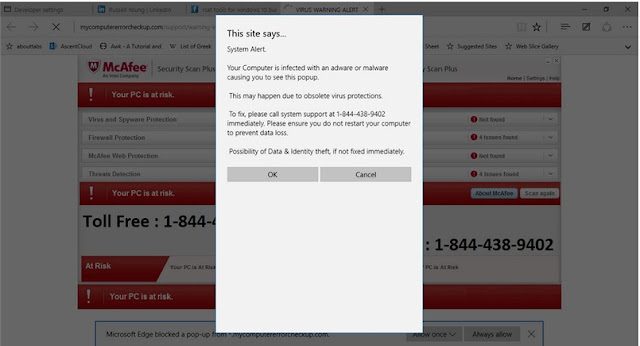
I just ran into a really nasty Browser Hijack on Windows 10
with Microsoft Edge.
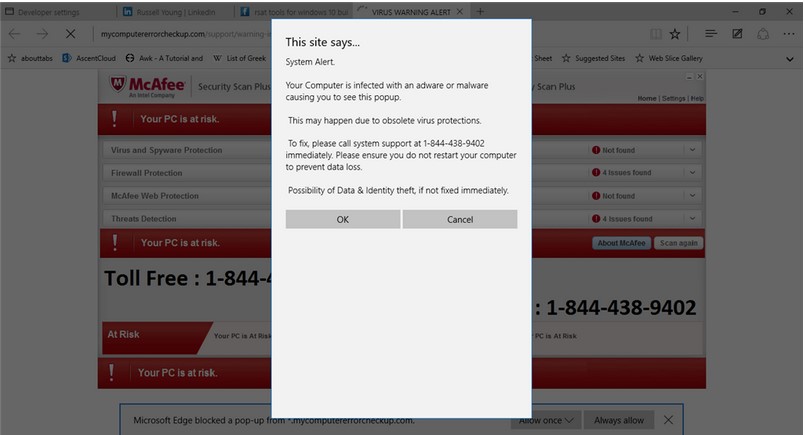
I clicked on a website link and was immediately presented the
below. I can't close it, I can't hit Alt-F4 to close it, I can't get to the setting for Edge. No problem normally right? Just close it with Task Manager and it will go away.
Then you can scan with Antivirus just to be sure….well not so much. When I re-opened
Edge I immediately got the same pop up again. Here is the thing….I could not
get it to close so I could not get around it. I tried closing the browser again
and same thing. I read a couple of articles online, one stating that if you
turn off networking you can reset it but no joy there either. There is a nine page long discussion here http://answers.microsoft.com/en-us/insider/forum/insider_internet-insider_spartan/edge-browser-hijacked-unable-to-reset/1768f671-90d9-4dfb-88c5-679a3664634a?page=1 that even up until today people are trying to figure this one out.
I found my answer here http://answers.microsoft.com/en-us/insider/forum/insider_wintp-insider_web/how-do-i-stop-all-these-damned-tabs-that-keep/75f8687c-ca58-4236-9919-bba58efc8249?page=1 through FirstBrownman's post.
What I had to do to fix this was
1.
Close the Edge Browser
2.
Navigate to the following directory C:\Users\<users>\AppData\Local\Packages\Microsoft.MicrosoftEdge_xxxxxx\AC\MicrosoftEdge\User\Default\Recovery\Active
3.
Delete everything in that directory.
You can now open Microsoft Edge back up again without the
above.
BTW this also works if you are experiencing a lot of popups in Edge as well!
At this time doing a scan
with Windows Defender does not work! So again....
Wednesday, August 12, 2015
The VMware Compatibility Guide is your friend!
Fairly simple one today folks!
I was trying to do an install of ESXi 5.1 U1 on a Cisco C240 M4 and getting a really pretty purple screen saying: NOT_IMPLEMENTED bora/vmkernal/hardware/apic.c:1048
Well, heck....there is was ....plain as day....
I was trying to do an install of ESXi 5.1 U1 on a Cisco C240 M4 and getting a really pretty purple screen saying: NOT_IMPLEMENTED bora/vmkernal/hardware/apic.c:1048
After a frustrating call to VMware support, I threw my hands up and went to the web to fix it myself (I Googled it of course).
I got what pointed me the right direction from this link.
Steve_Delassus pointed at a KB article and then said something simple...."Check the compatibility matrix and see if your server is in it".
I kicked my self a couple of times, then downloaded 5.1 U3 and it installed with no issues....
So what have I learned Boys and Girls? The VMware Compatibility Guide is your friend!
Thursday, August 6, 2015
SRM 6 NIGHTMARE!!!
***************************
Update 2
This case is now closed. Only advice that I can give at this point is be VERY careful when you are updating the Certificates in the MOB. If you do it wrong, you will be rebuilding your environment.
The below notes do work for fixing the MOB just make sure you know exactly what your syntax is supposed to be and know which Certificates you are replacing...
Back to the drawing board for me.....
*****SIGH*****
$#@%^&*&%$##^%^&!!!
***************************
UPDATE!!!
After going through all of this again (time has finally permitted me to get a back to this). I have finally got MOST of this working. I say most because I reset my PSC and vCenter Certs to the same thing and now I have to call support to see if I can change this! *Yes, I am an idiot* I will update again as I get this last part figured out.
VMware has updated KB2121701 so many times over the last couple of months that they must really be sick of that page.
The ROOT of the problem is the certificates that are associated with the PSC and the vCenter servers. If they get changed, for some reason VMware does not change them properly in the MOB *or where ever the info is stored* and it then falls on you the Admin to be clever enough to know this is the issue......
If you follow the instructions (very carefully I might add) it gives you instructions how to view what the current certificate that the MOB has listed for your PSCs and your vCenters , how to download a copy of those Certs to get a Thumbprint, how to download your current Certificates, and finally how to use the ls_update_certs.py * which you have to install a new one from the KB article* script to modify what is in the MOB pages. Below is the example from the article of the scripts you will run. I want to point out if you have multiple PSCs and vCenters you will need to do this for ALL of them! You also have to run this from the PSC server.
%VMWARE_PYTHON_BIN%" ls_update_certs.py --url https://psc.vmware.com/lookupservice/sdk --fingerprint 13:1E:60:93:E4:E6:59:31:55:EB:74:51:67:2A:99:F8:3F:04:83:88 --certfile c:\certificates\new_machine.crt --user Administrator@vsphere.local --password Password
You would need to do the above for:
1.) Your Production PSC *get the thumbprint for the old cert and download the new cert to a central location*
2.) Your Production vCenter *get the thumbprint for the old cert and download the new cert to a central location*
3.) Your DR PSC *get the thumbprint for the old cert and download the new cert to a central location*
4.) Your DR vCenter *get the thumbprint for the old cert and download the new cert to a central location*
I don't know how to make KB 2121701 easier to read but there has to be a way....it is a wealth of knowledge but....it is not easy to obtain that knowledge!
****************************
I am trying to love VMware vSphere 6 and Site Recovery Manager 6 (SRM). I am trying to show my confidence in VMware. It's not working though.....and I know, I broke the cardinal rule of IT “never adopt early.”
Update 2
This case is now closed. Only advice that I can give at this point is be VERY careful when you are updating the Certificates in the MOB. If you do it wrong, you will be rebuilding your environment.
The below notes do work for fixing the MOB just make sure you know exactly what your syntax is supposed to be and know which Certificates you are replacing...
Back to the drawing board for me.....
*****SIGH*****
$#@%^&*&%$##^%^&!!!
***************************
UPDATE!!!
After going through all of this again (time has finally permitted me to get a back to this). I have finally got MOST of this working. I say most because I reset my PSC and vCenter Certs to the same thing and now I have to call support to see if I can change this! *Yes, I am an idiot* I will update again as I get this last part figured out.
VMware has updated KB2121701 so many times over the last couple of months that they must really be sick of that page.
The ROOT of the problem is the certificates that are associated with the PSC and the vCenter servers. If they get changed, for some reason VMware does not change them properly in the MOB *or where ever the info is stored* and it then falls on you the Admin to be clever enough to know this is the issue......
If you follow the instructions (very carefully I might add) it gives you instructions how to view what the current certificate that the MOB has listed for your PSCs and your vCenters , how to download a copy of those Certs to get a Thumbprint, how to download your current Certificates, and finally how to use the ls_update_certs.py * which you have to install a new one from the KB article* script to modify what is in the MOB pages. Below is the example from the article of the scripts you will run. I want to point out if you have multiple PSCs and vCenters you will need to do this for ALL of them! You also have to run this from the PSC server.
%VMWARE_PYTHON_BIN%" ls_update_certs.py --url https://psc.vmware.com/lookupservice/sdk --fingerprint 13:1E:60:93:E4:E6:59:31:55:EB:74:51:67:2A:99:F8:3F:04:83:88 --certfile c:\certificates\new_machine.crt --user Administrator@vsphere.local --password Password
You would need to do the above for:
1.) Your Production PSC *get the thumbprint for the old cert and download the new cert to a central location*
2.) Your Production vCenter *get the thumbprint for the old cert and download the new cert to a central location*
3.) Your DR PSC *get the thumbprint for the old cert and download the new cert to a central location*
4.) Your DR vCenter *get the thumbprint for the old cert and download the new cert to a central location*
I don't know how to make KB 2121701 easier to read but there has to be a way....it is a wealth of knowledge but....it is not easy to obtain that knowledge!
****************************
I am trying to love VMware vSphere 6 and Site Recovery Manager 6 (SRM). I am trying to show my confidence in VMware. It's not working though.....and I know, I broke the cardinal rule of IT “never adopt early.”
VMware has been my favorite technology for
a long time! I drank the Kool-aide and in my mind there is not another company
that is doing the kinds of things that they are. Let's face it though....nobody
is perfect.
I have now had a case open with them since
June 8th about Site Recovery Manager 6 and vCenter 6, about 2
months. I have talked to some great techs there at VMware, but to me I am
beginning to sense that there is a lot of confusion among their ranks about the
new products. I have had techs tell me that I had to have the same certificate
for both the protected and recovery site in order for things to work, and yet
their install and configure manual clearly says different. I have had
technicians that did not know what the VMCA is and what the function of it was,
going as far as to tell me that I needed to do individual certs for each of my
vCenter servers, Platform Services Controller (PSC) servers and my ESXi
servers. I still have not gotten a good answer as to if SRM and the VMCA work
together or if they will sometime in the future. Heck, the first month of my
case was spent calling and begging their support team to call me back, it wasn’t
until my VP called and started screaming that I started getting any serious
traction on the case.
The frustrating part? I have done a bog standard install of SRM. I
have setup my environment with VMware’s best practices. I have even gone so far
as to ask the technicians to verify the install.
The PSCs are External. The vCenter Servers and the SRM servers are
stand-alone VM servers. I made my VMCAs
into a subordinate Certificate Authorities to my in-house Certificate Authority
so that all of my clients would trust the sites and we would not have issues.
It is exactly as VMware shows it in a standard Two-Site Topology
with one vCenter Server instance per Platform Services Controller (PSC).

My issue?? Here goes, when
I go to Site Recovery>Sites from my production server, I immediately
get the below message:

Error: Failed to connect to Lookup Service at HTTPS://DRPSCSERVER.DOMAIN.COM:443/lookupservice/sdk.
Reason:
com.vmware.vim.vmomi.core.exception.
CertificateValidationException: Server certificate chain not verified.
Simple right? My certificates on my vCenter must not be trust that
PSC chain right? One of the servers must not be have the chain or the
certificate for the DR site….but they do. VMware has verified they do. I can go
to the DR PSC server from my Production vCenter Server and it shows the site as
trusted…
 VMware has combed the logs, and “We ain’t found….”
Now, if I try the same exact thing from the DR side what happens
you ask? Same exact thing, but the error message says that it certificate chain
is not valid for the Production PSC server. Which is really weird….because I
can see both vCenter servers on both the Production and DR sites. Oh, and once
again I can go to the Production PSC from the vCenter server and it shows the
site as well.
Ahh….so it must be the PSCs don’t trust each other…..NOPE. I can
go to each of the PSCs and they both trust the other.
Well so that leaves the SRM servers right? One of them must be the
culprit. Well, as before …the vCenter servers all look trusted, and so do the
PSC servers. The certificates that the SRM servers have are actually from the
parent CA. So they are trusted all the way through….
I am bumfuzzeled….
If anyone has any advice on this PLEASE speak up! Once I get a
solution I promise I will append it to this entry….

Subscribe to:
Posts (Atom)